

Investigating a remote IT worker scam: A field guide for DFIR teams
By Steve Gemperle
Key takeaways
- The remote IT worker scam starts with hiring, so investigators need HR, payroll, and vendor records alongside endpoint and log data.
- Shipping a laptop to a facilitator’s address makes a remote worker appear to be in the U.S. Comparing the shipping address, IP addresses, VPN exits, and MFA enrollment location against the claimed residence can expose it.
- No single red flag proves fraud. Several indicators that point to the same address, device, or payment destination are a stronger signal.
- Preserve evidence before disabling access, then work out whether the worker only collected wages or also exfiltrated data.
The remote IT worker scam starts with a job application. Like many forms of digital fraud, it relies on trust: the organization believes it’s hiring a real person and hands over access accordingly. A worker using a false identity may pass interviews, receive a company laptop, and gain legitimate access to the organization’s systems. Behind that apparently routine onboarding process may be U.S.-based facilitators, laptop farms, remote access tools, and arrangements that divert wages to other parties. In some cases, the activity extends to data theft or extortion.
That means investigators have two questions to answer: how the fraud was carried out, and what the worker did once inside. The evidence is split across hiring and identity records, device activity, login locations, payment records, repository activity, and communications. This guide covers how the scam works, the red flags to watch for, what to collect, and a step-by-step investigation workflow. If you’re already gathering evidence from other teams, skip to the sample evidence request list.
How the remote IT worker scam works
These scams typically move through a series of stages, from building a false identity to drawing wages and, in some cases, taking data. Each stage touches a different part of the organization, which is why the investigation has to span HR, IT, security, and finance.
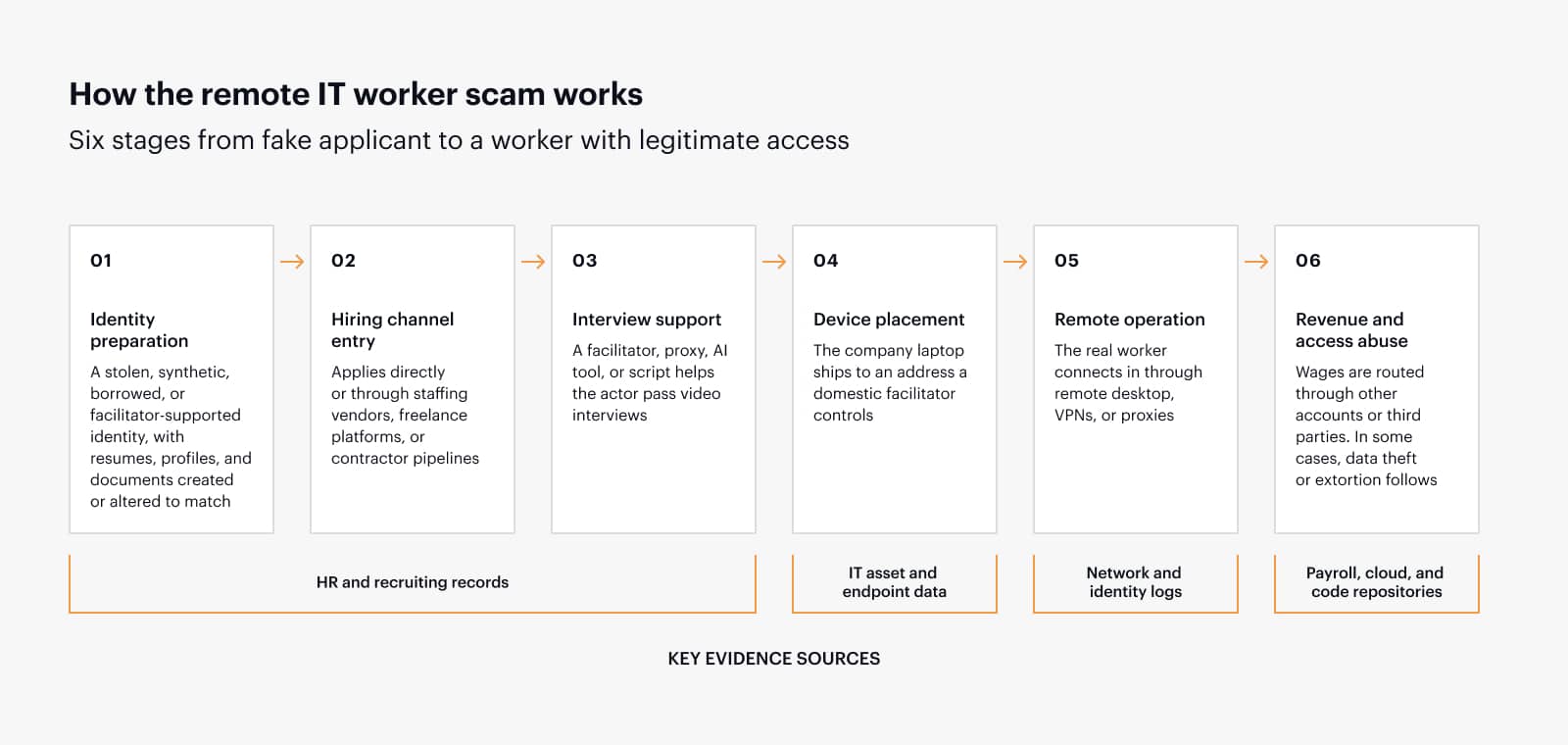
- Identity preparation: The actor uses a stolen, synthetic, borrowed, or facilitator-supported identity. Resume content, portfolio sites, job board profiles, social media, payment accounts, and identification documents are created or altered to support the cover story.
- Hiring channel entry: The actor applies through direct hiring, staffing vendors, freelance platforms, or contractor pipelines. The technical skill may be real, which helps the candidate appear credible.
- Interview support: A domestic facilitator, proxy, AI tool, or scripted response process helps the actor pass video interviews. Some signs to watch include mismatched identity details, unusual delays in responses, inconsistent audio/video behavior, or answers that feel scripted.
- Device placement: Once the worker is hired, the company ships a laptop to an address controlled by a domestic facilitator. The facilitator keeps the device and connects it to a domestic location or reships it. This creates the appearance that the worker is operating from inside the U.S.
- Remote operation: The actual worker connects through remote desktop software, VPNs, VPS infrastructure, residential proxies, or other tunneling methods to use the company-issued device.
- Revenue and access abuse: The wages are routed through bank accounts, payment processors, cryptocurrency, or third parties. In higher-risk cases, the worker may copy source code, harvest credentials, access cloud storage, or extort the company after discovery.
Common red flags
No single indicator proves fraud, and some may have reasonable explanations. The signs below are most useful when several appear together or point back to the same address, device, or payment destination.
- Multiple workers or applicants sharing the same address, phone number, emergency contact, profile language, resume structure, device shipping location, or payment destination.
- Identity documents with inconsistent formatting, mismatched metadata, low-quality edits, altered headshots, or details that do not align with payroll, tax, HR, or background check records.
- Logins from countries, VPN providers, data centers, or residential proxy networks that do not match the worker’s claimed location.
- Company laptop showing signs of unattended remote control, remote desktop tools, remote administration utilities, unauthorized VPN clients, tunneling software, or persistent access agents.
- Unusual work patterns, such as activity during local sleeping hours, rapid context switching between accounts, or repeated short sessions from different IP addresses.
- Use of personal cloud storage, private code repositories, mass data transfer, compressed archives, or file movement outside approved channels.
- Requests to avoid video calls, change payment methods, route compensation to a third party, or ship devices to addresses that do not match verified residence details.
Digital forensics collection priorities
The evidence in these cases is spread across teams that each hold part of the picture. The table below sets out the main sources, what to collect from each, and why it matters.
| Evidence source | What to collect | Why it matters |
|---|---|---|
| Endpoint | Full disk image or targeted collection, installed programs, prefetch, event logs, browser artifacts, remote access configuration, scheduled tasks, persistence locations, USB history, clipboard and recent file artifacts where available. | Shows whether the company device was remotely controlled, used by multiple operators, or configured to bypass policy. |
| Identity and access logs | SSO logs, MFA registrations, IP addresses, device IDs, user-agent strings, impossible travel alerts, session tokens, conditional access events, failed logins, and authentication method changes. | Establishes the real access pattern and whether the account was used from inconsistent locations or devices. |
| Network telemetry | VPN logs, firewall logs, DNS, proxy logs, EDR network connections, RDP/remote tool traffic, data center IPs, residential proxy indicators, and unusual outbound connections. | Helps identify remote control infrastructure and tunneling behavior. |
| Cloud and SaaS | Email, chat, file sharing, source code platform events, repository cloning, API token creation, OAuth grants, file downloads, sharing events, and personal account connections. | Determines whether data was copied, staged, shared, or exfiltrated. |
| HR and payroll | Application records, interview recordings if retained, identity documents, address history, tax records, payment routing, emergency contact data, vendor records, and device shipment details. | Connects technical evidence to fraud indicators and facilitator infrastructure. |
For a more detailed list organized by team, see the sample evidence request list below.
Practical investigation workflow
The order of operations matters. Disabling access or confronting the worker too early can alert them before evidence is preserved. The steps below put preservation first.
- Stabilize quietly: Preserve logs and avoid alerting the suspected worker until counsel, HR, security, and leadership agree on the response plan. It is important to be able to covertly collect from the endpoint in question.
- Scope the identity: Build a timeline from application through onboarding, device shipment, first login, tool installation, repository access, payroll changes, and any suspicious data movement.
- Correlate locations: Compare claimed residence, device shipping address, payroll address, IP geolocation, VPN exits, MFA enrollment location, and remote desktop source locations.
- Analyze the endpoint: Look for remote administration tools, secondary users, unusual startup entries, unauthorized browser profiles, copied credentials, cloud sync clients, and artifacts showing hands-on-keyboard activity inconsistent with the claimed user.
- Review code and data access: Identify repositories cloned, branches accessed, secrets viewed, archives created, large downloads, remote access to build or deployment systems, and connections to personal cloud or developer accounts.
- Map facilitators: Search for shared addresses, payment accounts, phone numbers, shipping labels, vendor contacts, front company websites, and repeated resume or portfolio patterns across other employees or applicants.
- Assess impact: Determine whether the worker only received wages under false pretenses or also accessed, copied, altered, or exfiltrated sensitive data.
- Coordinate response: Preserve evidence, disable access in a controlled sequence, recover company equipment where feasible, rotate exposed credentials, revoke tokens, notify legal and compliance teams, and prepare law enforcement reporting.
Key forensic questions to answer
These questions help keep the investigation focused on what the organization needs to determine, from who controlled the account to which legal obligations apply.
- Who actually controlled the account, and from where?
- Was the company-issued device physically located where the worker claimed to be?
- Were unauthorized remote access tools installed or used?
- Did the worker copy source code, secrets, customer data, export-controlled material, financial data, or credentials?
- Were personal cloud accounts, private repositories, cryptocurrency wallets, or third-party payment accounts involved?
- Are there other applicants, contractors, or employees with overlapping indicators?
- Did any vendor or staffing agency fail to validate identity or device custody?
- What legal, sanctions, notification, contractual, and law enforcement obligations are triggered?
Containment and remediation
When the evidence supports acting, containment should happen in a planned sequence rather than all at once. The goal is to remove the worker’s access completely without destroying records the investigation still needs.
- Disable account access only after critical logs are preserved and the response team is ready.
- Revoke active sessions, refresh tokens, OAuth grants, SSH keys, API keys, personal access tokens, and developer credentials.
- Rotate secrets that were accessible to the worker, including repository secrets, cloud keys, service account credentials, build pipeline tokens, and database credentials.
- Block unauthorized remote access tools and review endpoint policy exceptions.
- Quarantine or collect affected devices, then validate whether the device was physically hosted by a facilitator.
- Search for related indicators across other employees, applicants, contractors, and vendors.
- Review vendor agreements, background check procedures, device shipping controls, and sanctions screening processes.
Prevention tips for investigators and security teams
Many of the gaps these schemes exploit sit between teams. The controls below focus on verifying identity, device custody, and access, and on getting HR, IT, security, payroll, and vendor data in front of the same people.
- Require strong identity proofing for remote workers before access is granted and repeat verification during employment when risk indicators appear.
- Verify that the person interviewed is the person onboarded, paid, and using the device.
- Ship devices only to verified addresses and require secure device enrollment before production access.
- Use conditional access policies that restrict logins by device compliance, geography, impossible travel, and unmanaged devices.
- Maintain an approved remote access software list and alert on unauthorized tools.
- Monitor developer environments for mass cloning, personal repository use, unusual compression, secret access, and large downloads.
- Correlate HR, IT, security, payroll, and vendor data rather than leaving each team to review its own silo.
- Create a playbook specifically for remote IT worker fraud investigations so the organization does not improvise during an active case.
Sample evidence request list
Use this list as a practical starting point when issuing preservation notices, internal evidence requests, or third-party collection requests. Tailor the scope to the suspected worker, relevant dates, legal hold requirements, and the systems actually used by the organization.
- Candidate application package, resume versions, cover letters, portfolio links, job board submissions, and recruiter notes.
- Interview schedules, interviewer feedback, video interview recordings (if retained), chat transcripts, assessment results, and coding test submissions.
- Identity-verification records, background check reports, work-authorization documents, tax forms, address records, and any exceptions or manual overrides.
- Onboarding records, offer letters, employment agreements, contractor agreements, confidentiality agreements, and security policy acknowledgments.
- Emergency contact information, personal phone numbers, personal email addresses, mailing addresses, and any changes made after onboarding.
- Records showing whether the same address, phone number, reference, recruiter, staffing vendor, or emergency contact appears across other candidates or workers.
- Device assignment records, serial numbers, hostnames, asset tags, device enrollment dates, assigned users, and custody history.
- Shipping records, tracking numbers, delivery confirmation, recipient names, delivery addresses, return labels, and any reshipment information.
- Endpoint management records, compliance state, installed software inventory, local user accounts, administrative group membership, firewall settings, and configuration profiles.
- EDR telemetry, process execution, network connections, file creation events, persistence artifacts, remote access tool detections, and suspicious command-line activity.
- Operating system event logs, authentication logs, remote desktop logs, prefetch artifacts, browser artifacts, cloud sync artifacts, USB history, and recent file activity.
- Records of help desk tickets, password reset requests, MFA reset requests, device troubleshooting, remote support sessions, and unusual access requests.
- SSO logs, MFA enrollment history, conditional access events, failed and successful login records, session duration, user-agent strings, device identifiers, and authentication method changes.
- VPN logs, proxy logs, DNS logs, firewall logs, secure web gateway records, ZTNA records, and remote access gateway logs.
- Alerts related to impossible travel, anonymous proxy usage, data center IP addresses, residential proxy activity, suspicious token use, or unmanaged device access.
- Cloud identity records, OAuth consent grants, personal access tokens, API keys, SSH keys, service account use, privilege changes, and group membership changes.
- Security alerts, incident tickets, analyst notes, case timelines, prior investigations, and any related indicators tied to other employees, contractors, or applicants.
- Email mailbox exports or targeted searches for onboarding, payroll, vendor, personal email, shipping, credential, and file sharing terms.
- Chat messages, channel membership, direct messages, file transfers, meeting participation, and communications with external accounts.
- Cloud storage audit logs, file downloads, sharing events, external shares, deleted files, synchronization activity, and access from personal or unmanaged devices.
- Source code repository logs, repository cloning, branch access, pull requests, commits, fork activity, deployment access, package registry activity, and private remote configurations.
- Secret management access logs, build pipeline logs, artifact downloads, container registry activity, and infrastructure-as-code repository access.
- Payroll setup records, bank account details, payment change history, direct deposit forms, tax forms, payment processors, and third-party payment instructions.
- Invoices, vendor payment records, contractor statements of work, purchase orders, timekeeping records, expense reports, and reimbursement requests.
- Records showing payment routing to accounts that do not match the worker’s claimed identity, address, tax information, or employment arrangement.
- Any cryptocurrency-related payment requests, unusual payment timing, split payments, or requests to route funds through another individual or entity.
- Vendor master data, staffing agency records, recruiter payment information, and any shared financial indicators across multiple workers or candidates.
- Candidate sourcing records, recruiter communications, screening notes, background check documents, identity-verification records, and interview logistics.
- Copies of contracts, statements of work, work orders, invoices, and vendor compliance attestations.
- Device shipping instructions, mailing addresses, contact names, phone numbers, alternate email addresses, and any request to route hardware through another party.
- Records identifying whether the same recruiter, account manager, address, payment destination, or phone number appears across multiple candidates.
- Vendor security reviews, due diligence records, contractual identity proofing requirements, and any notice of prior suspicious activity involving the same vendor.
- Legal hold notices, preservation instructions, investigation scope memos, privilege protocols, and chain-of-custody documentation.
- Applicable contracts, nondisclosure agreements, acceptable use policies, sanctions screening records, data classification guidance, and notification requirements.
- Prior incident reports, related hotline complaints, insider risk referrals, vendor risk findings, and law enforcement correspondence if already initiated.
- Decision logs showing when access was preserved, restricted, disabled, or restored, and who approved each action.
- Final evidence index, custodian list, systems searched, search terms used, collection dates, gaps, and unresolved follow-up items.
Bringing it all together
A suspected remote IT worker scam rarely comes into focus from a single log entry or an unusual interview. The picture becomes clearer when investigators bring the hiring records, device activity, access logs, and payment trail together and test what they find against reasonable explanations. Preserve the evidence, document what is known and what remains uncertain, and keep HR, legal, and security working from the same facts. That approach gives the organization a sound basis for protecting its people and data, responding fairly, and closing the gaps that allowed the scam to take hold.
About the author

Steve Gemperle is the Manger of Technical Marketing and Forensics at Magnet Forensics. Prior to joining Magnet, Steve was a Senior Special Agent with the United States Secret Service who specialized in cyber-crime until retiring in 2021. For the last decade of his career with the Secret Service he focused on computer crimes and served as Lab Director for the US Secret Service Southwest Regional Computer Forensic Lab. Steve has completed over 1900 forensic exams and 150 network intrusion investigations while working for the Secret Service, and has been recognized as one of the US Secret Service’s top network intrusion investigators.