


Windows Forensics: Understanding and Analyzing Pagefile.sys Artifacts
The Windows pagefile.sys is a fundamental source of digital evidence in digital forensics investigations and incident response. When live RAM capture is unavailable, either due to a system shutdown, oversight, or other factors, this system-managed file can serve as the last resort for recovering critical memory-related evidence. Examples of artifacts within pagefile.sys may include fragments of documents, chat messages, credentials, email, media files, or malicious payloads, offering investigators an opportunity to reconstruct user activity and uncover evidence that would otherwise be lost.
Why the pagefile.sys matters in Windows forensics:
- May be the only source or memory-related data if RAM was not captured
- Can provide insight into users’ actions
- Often includes data from recent or running processes
- Preserves volatile data generated from RAM before shutdown
- Non-volatile data survives a system reboot, unlike live memory
- Can include plaintext data from encrypted files or encrypted chat
- May contain passwords or credentials in plaintext data
- Helps recover traces of malware that only operated in memory

Pagefile.sys is a hidden system file in Windows that serves as an extension of physical RAM. When RAM becomes full, Windows moves less-used pages to pagefile.sys on disk, a process known as paging. This process of memory paging helps the system remain stable and responsive, even when under a heavy memory load. Pagefile.sys can be thought of as a spillover location from physical RAM.
Like many system files in Windows, it was designed for performance, but it’s yet another Windows artifact that can create a forensic goldmine of decrypted chats, documents, and more. Also, since pagefile.sys is a file on the disk, it persists across reboots. Unlike volatile RAM, it can contain critical evidence long after a system is powered off.
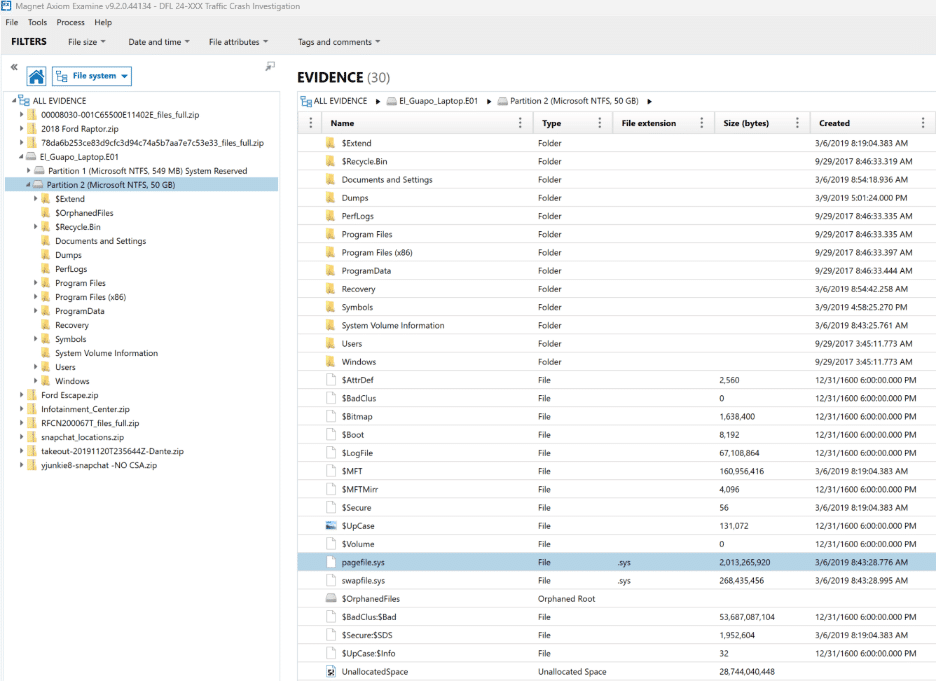
What Examiners Can Actually Pull from Pagefile.sys
When you’re working a case, pagefile.sys isn’t just “extra RAM on a disk.” It’s a snapshot of user activity that Windows preserves, which makes it more valuable to us. Every time the system pages memory out to disk, it’s quietly creating an opportunity for examiners to recover data users may assume vanished when they closed the app or rebooted the machine.
Depending on system usage, you may find:
- Fragments of decrypted chat messages from platforms that normally safeguard memory
- Document remnants, even when the original files were never saved
- Plaintext credentials that briefly lived in RAM before being sent to pagefile.sys
- Malware code, configuration data, or scripts that executed only in memory
- Snippets of media that were processed by a browser or an application
In other words, pagefile.sys becomes a kind of accidental time capsule – volatile data preserved long after the system goes dark. But you never know what you’re going to get.
Why this Matters in Real Investigations
In the field, we don’t always get the luxury of a RAM capture. Maybe the machine was shut down during the arrest or initial investigation. Maybe IT pulled the plug during an incident response. Maybe the suspect powered off the machine. Maybe the system crashed. Whatever the reason, the moment RAM disappears, pagefile.sys can become the last surviving witness.
There are many examples in which:
- A single chat message in pagefile.sys confirmed a timeline or a piece of evidence
- A credential artifact cracked open other evidence
- A memory-only malware sample left just enough behind in the swap file to prove an execution
- Cached fragments of documents filled in critical gaps and provided even more evidence
Pagefile.sys doesn’t give you everything, but it can give you enough. And, in digital forensics, “enough” is sometimes the difference between a hunch and a conviction.
Making Sense of the “RAW” Chaos
Pagefile.sys isn’t pretty. It’s a raw heap of memory pages stitched together without context. But that doesn’t mean it’s hard to use. Magnet Axiom carves pagefile.sys artifacts automatically, giving you the key pieces without having to reverse engineer Windows memory management.
These methods can be supplemented with, or manually validated through, Axiom’s builtin analysis tools:
- Strings carving for quick triage
- Keyword sweeps to hit on likely text remnants
- File carving for partial media or document recovery
- Process-focused analysis if you know what was running when the data was potentially swapped
Think of it as RAM analysis with the sharp edges filed down – less structured , but often more revealing than expected.
Pagefile.sys isn’t magic, and it won’t replace a good RAM capture and analysis, but it absolutely earns a spot in your forensic playbook. It’s messy, it’s inconsistent, and it’s never the same twice. But that’s its job. It’s one more place Windows hid the truth, and one more place we know to look.