



When Windows takes a nap and leaves you evidence: Inside hiberfil.sys
Hiberfil.sys is one of those Windows artifacts every examiner should know about. It can contain a near-complete capture of system memory but is also tricky to collect and parse.
- What it is: Hiberfil.sys is the Windows hibernation file that holds the memory image when a system hibernates (including “Fast Startup”/hybrid boot data).
- Why it matters: It can contain volatile evidence and evidence that may not exist elsewhere on the drive image.
- Collection: Collecting a usable hibernation image from a running system is complex and often impractical. A powered-off (“dead box”) acquisition that preserves the hiberfil.sys on disk is usually the most reliable approach. Encryption (e.g., BitLocker) and OS locks can make offline analysis impossible without keys.
What hiberfil.sys contains (and why examiners care)
A hiberfil.sys file typically contains:
- A snapshot of physical RAM pages at hibernation time
- Memory-resident process data such as open documents, decrypted credentials, keys, loaded modules, command-line history in memory, and in-memory-only malware code
- Kernel structures and drivers loaded at suspend time (valuable for rootkit/malware detection)
- Session and user context, including active logon sessions and possibly cached network connections
- Data useful to reconstruct timelines (running processes, open sockets, and in-memory timestamps)
- Partial vs Full: Windows 10+ introduced “Fast Startup” which creates a partial hiberfil.sys (kernel session only, no user sessions), so what you get depends on the hibernation mode
Commonly not contained:
- Persistent disk-only artifacts: File contents stored only on disk and not present in RAM at hibernation, unless they were loaded into memory
- All historical data: It’s a snapshot at one point in time (hibernation moment), not a rolling log.
Why it’s special:
- It can reveal transient data: things that do not persist on disk in cleartext but live in memory (e.g., plaintext passwords, decrypted blobs, and other ephemeral data).
How hiberfil.sys is written and updated by Windows
- When the user or system initiates hibernation, Windows writes the memory pages that need to be preserved into hiberfil.sys and then powers off.
- On modern Windows, hybrid boot/Fast Startup uses a similar mechanism, hiberfil.sys content may be created on shutdown to speed boot.
- The file is overwritten on each hibernation cycle; older snapshots are not kept.
- The OS controls the format and can change it between Windows versions; it typically contains headers and a container of compressed memory blocks/pages.
Compression and (non-)encryption details
- Compression: Windows writes memory to disk in a compressed form to save disk space and I/O. The compression algorithm and internal format have varied across Windows versions. The data inside hiberfil.sys is therefore not raw RAM bytes; it must be decompressed and reorganized to reconstruct a raw memory image.
- Encryption at rest: By default, hiberfil.sys is not separately encrypted as a distinct file by Windows. However:
- If BitLocker or another full-disk encryption (FDE) is enabled, hiberfil.sys is stored on an encrypted volume; you will need the FDE keys to access it offline.
- If the system uses modern OS features that protect memory (e.g., certain hardware/firmware protections or hibernate file protections in OEM builds), additional obstacles can exist.
- Kernel-protection / locked file: When the OS is running, the file is locked by the system and cannot be copied without privilege or specialized techniques.
Collection challenges: Running vs. dead acquisition
Collecting from a running machine:
- Pros: you can capture current memory live, which yields a true live RAM image.
- Cons: Capturing hiberfil.sys while the system is running is challenging because the OS keeps it locked and may be actively updating; copying a locked hiberfil.sys file risks corruption or inconsistent snapshots. Live acquisition also alters system state (processes, network connections) and may modify volatile evidence.
Collecting from a powered-off/dead machine:
- Pros: If the system was hibernated or used Fast Startup, hiberfil.sys may exist on disk at rest and can be acquired as part of a forensic disk image (bit-for-bit). This is the preferred route to preserve the hiberfil.sys intact without OS interference.
- Cons: If full-disk encryption is used, you must obtain the decryption keys. If the system was shut down normally (not hibernated), there may be no hiberfil.sys file to acquire.
Bottom line: If the system is reachable and already hibernated (and you can acquire the disk image), perform an offline acquisition of the disk (with a write blocker) and preserve hiberfil.sys. If the system is running and will remain running, prefer a controlled live memory capture (document every step).
Key artifacts recoverable from hiberfil.sys
Because hiberfil.sys contains a compressed snapshot of physical RAM, it preserves a wide range of volatile evidence that would otherwise evaporate the moment the system shuts down. When properly parsed and reconstructed into a raw memory image, investigators can extract data from several artifact categories.
Running processes and execution state
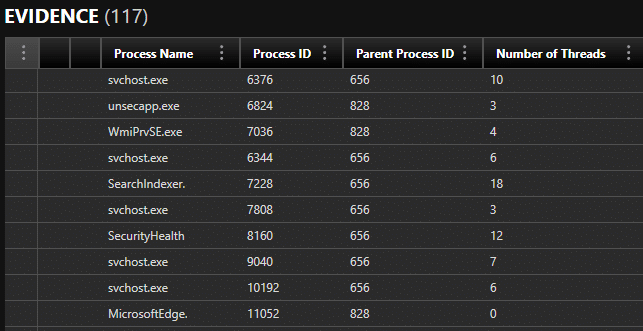
One of the most valuable aspects of a hibernation file is the ability to recover process execution artifacts that reveal what the system was actively doing at the moment hibernation began. Artifacts commonly recoverable include: Active processes at the exact moment of hibernation (e.g., cmd.exe, powershell.exe, browsers, malware, system services)
- Parent/child process relationships
- Process command-line arguments, including hidden or suspicious flags
- Loaded DLLs and modules
- In-memory-only malware components, including injected code or reflective loaders
- Timestamps (process creation time, load times, etc.)
- Persistence mechanisms loaded in memory but not yet committed to disk
Recovering the actual state of running processes lets investigators determine:
- What was actively executing
- What the user or malware was doing immediately before hibernation
- Whether scripts, implants, or tools existed only in memory
This evidence is often not present on disk, making hiberfil.sys uniquely valuable.
File-related artifacts
Although hiberfil.sys does not permanently store file system metadata, RAM frequently contains file handles, file paths, cached content, and plaintext copies of open documents. Artifacts commonly recoverable in this category include:
- Open files at hibernation time (document titles, temp paths, recent files)
- Memory-resident fragments of documents (e.g., Word, PDFs, encrypted containers that were open)
- File paths used by processes
- Recently accessed file lists cached in application memory
- Decrypted content of files protected by on-disk encryption (if keys were in memory)
You may also recover:
- Evidence that a sensitive document was opened, copied, or exfiltrated
- Plaintext from encrypted containers (BitLocker, VeraCrypt, etc.)
- File handles showing access patterns not found on disk-based artifacts
Network connections and session data
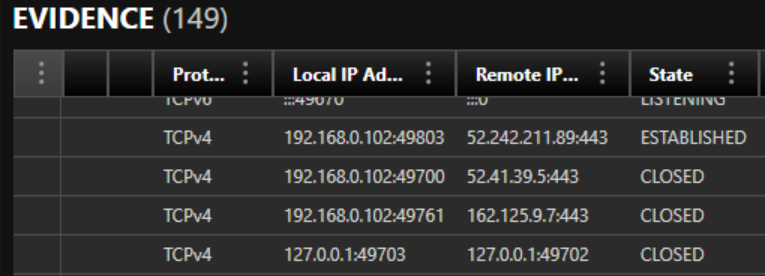
Because active network sessions live in RAM, hiberfil.sys often contains historic snapshots of the system’s network state. Artifacts commonly recoverable may include:
- Active TCP/UDP connections at the time of hibernation
- Remote IP addresses, ports, and connection states
- Process-to-connection mapping (e.g., which process owned connection to X.X.X.X:443)
- DNS cache entries
- Credentials or tokens in memory for logged-in services/web sessions
- VPN configuration memory
- Browser session artifacts such as:
- Cookies
- Session tokens
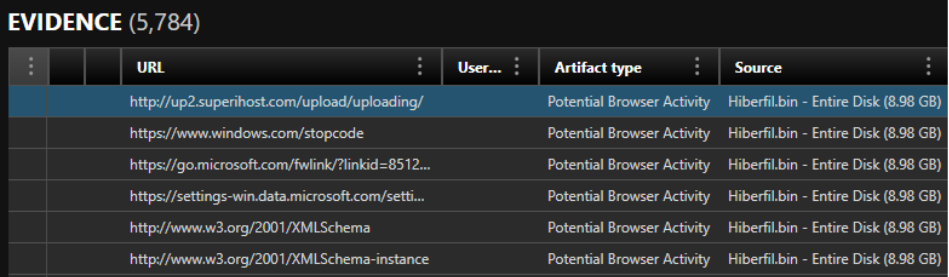
- URLs stored in memory
- Referrers
Network artifacts help investigators determine:
- Which applications were communicating externally
- Whether exfiltration tools were active
- Whether tunneling, C2 communication, or remote access tools were running
- What cloud services/accounts were authenticated at the time
These artifacts are especially valuable in insider threat, malware, and data exfiltration investigations.
Credential, authentication, and security artifacts
While this category is highly sensitive, memory sometimes includes:
- Cleartext passwords (rare, but possible)
- Decrypted credential material (DPAPI master keys, Kerberos tickets, NTLM hashes)
- Session tokens for SaaS platforms (Microsoft 365, Google Workspace, Slack, etc.)
- Cached authentication artifacts used by browsers and desktop applications
These can help reconstruct unauthorized access, privilege escalation, or cloud activity.
User activity and application state
Applications often store volatile information in RAM, including:
- Chat messages
- Browsing activity
- Clipboard contents
- Recently opened tabs (Chrome/Edge/Firefox)
- In-memory logs or buffers
- Shell history (PowerShell, CMD)
Because hibernation freezes system state at an exact moment, this creates a time capsule of what the user was doing.
Use case: Law enforcement, homicide/suspect laptop
Scenario: Investigators seize a laptop during a homicide investigation. The laptop appears shut down but has been hibernated (hiberfil.sys present). Investigators suspect the suspect used encryption and had live messaging apps open.
Actionable steps:
- Forensically acquire the whole disk (bit-for-bit) with a write-blocker—preserve hiberfil.sys.
- Determine if BitLocker is present. If so, obtain a recovery key (from suspect, cloud backup, or warrant to the vendor).
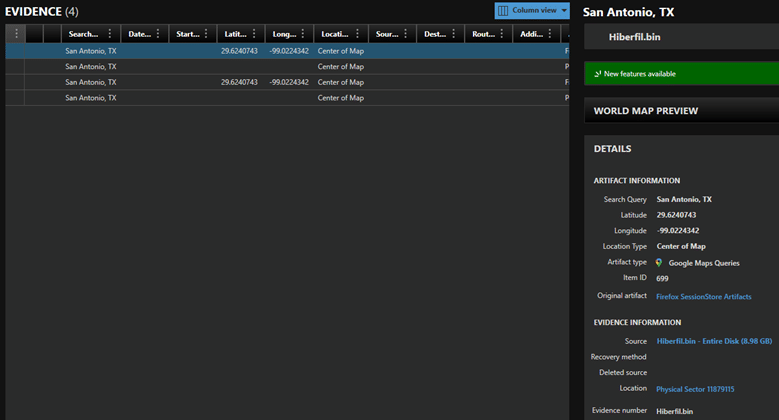
- Parse hiberfil.sys, convert to bin/dmp/related file and analyze in Axiom to extract running processes, decrypted chat contents resident in memory, attachments in memory, and potential ephemeral evidence (maps, URLs).
- Correlate memory artifacts to disk files (chat databases, browser caches) and external evidence (cellphone logs, CCTV) to build timeline for court presentation.
Why this matters:
- Hiberfil.sys may contain chat messages or password-derived keys not present on disk. Recovery of those can be case-crucial to proving intent, timing, or linking the suspect to criminal activity.
Use case: Private sector, insider data exfiltration
Scenario: An HR investigator suspects an employee exfiltrated sensitive IP. The employee’s workstation was hibernated and later seized.
Actionable steps:
- Acquire disk image and preserve hiberfil.sys.
- Determine corporate policy on endpoint encryption; obtain keys via enterprise key escrow if necessary.
- Convert hiberfil.sys to bin/dmp/parseable format
- Parse hiberfil.sys and search memory for transfer tools (rsync/WinSCP processes), credentials used for cloud uploads, or in-memory artifacts indicating connections to external sinks.
- Use Axiom to link found IP to file system artifacts (recently opened files, last-access timestamps) and to prepare internal reporting for HR and legal.
Why this matters:
- Memory evidence may show the exfiltration method (a custom tool or script), session authentication tokens, or transient deletion commands, allowing the company to remediate access, terminate sessions, and pursue disciplinary or civil action.
- In addition, hiberfil.sys analysis can also surface stealthy malware footprints hidden processes, injection artifacts, or anomalous network endpoints, which leave no persistent files on disk.
Reporting:
- Explain to stakeholders (prosecutors, corporate counsel) that hiberfil.sys evidence is a snapshot of memory and can contain ephemeral data.
To learn more about investigating employee misconduct, see this Magnet Forensics blog.
Final thoughts on hiberfil.sys
Live memory acquisition remains one of the most valuable forms of volatile evidence collection, often providing the most complete view of active processes, decrypted data, and real-time system state. However, when live RAM isn’t accessible, whether due to a powered-off system, remote-access limitations, or investigative constraints, hiberfil.sys becomes a high-value, high-complexity artifact that can preserve critical remnants of that volatile state. When available and accessible, it often reveals information you can’t recover from disk alone, but extracting that value requires care, the right tools, and a strong understanding of Windows’ hibernation behavior and encryption controls. In many investigations, the difference between “no evidence” and a decisive lead will come from a properly acquired and correctly parsed hibernation image.
Magnet Forensics can help you turn complexity into clarity. Our industry-leading solutions empower your team to quickly deliver results that make a difference. Contact us today and learn how we can give your team an Investigative Edge.