



Smarter searches, faster results: Magnet Review’s latest updates save you time on every case
The latest evolution of Magnet Review is here with a powerful new feature to help you and your investigative teams work smarter and faster: Intelligent Search.
With Intelligent Search, our new Magnet AI-powered search tool, you can surface more meaningful leads from thousands of media files and chat threads in seconds. Combined with major performance enhancements — including an 84% boost in ingestion speed! — you’re sure to spend less time waiting and more time uncovering the truth.
Surface more meaningful leads in seconds with Intelligent Search
Media files like pictures, audio, and videos can contain valuable insights that can be tremendously useful in your cases.
Unfortunately, these insights can be very difficult to surface. Conventional keyword-based search techniques aren’t effective at interpreting the meaning of an image or the context of a conversation in a video. This means that examiners and investigators must manually search through these files, which can take up hours upon hours of valuable investigation time.
The solution to this problem lies in new search technology better suited to the task: Intelligent Search.
Intelligent Search is a new set of Magnet AI-powered features in Review that enables natural language search for content contained in audio, images, video, and text from chats and emails. Now, your investigative teams can quickly and easily surface more meaningful search results—saving valuable time in any case.
Intelligent Search is now available for Review Lite, Review Essentials, and Review Advanced customers in the US and UK, with support for additional regions coming soon.
How Intelligent Search works
Just ask what you’re looking for
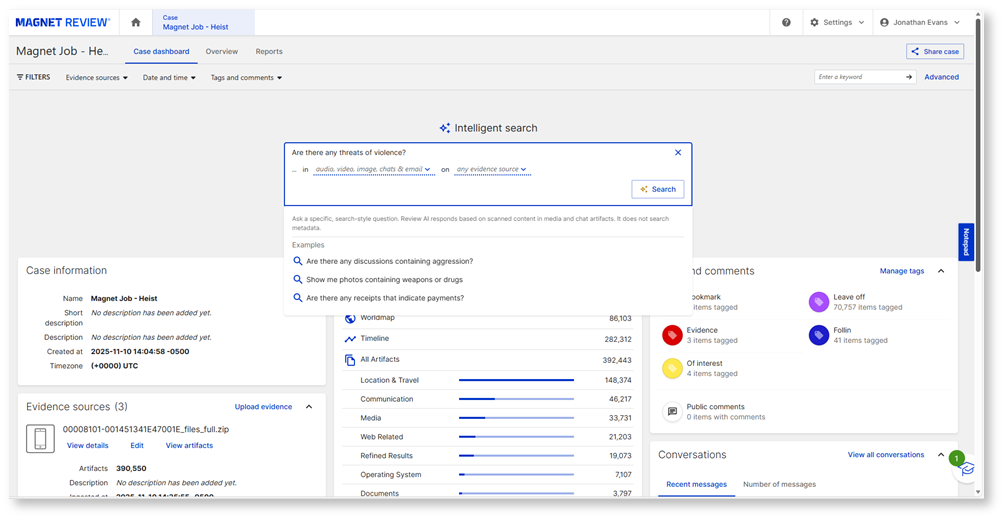
When a new case is uploaded into Review, you’ll now see the Intelligent Search bar at the top of your screen as a convenient new way to kick off your investigations. Intelligent Search also appears as an Explorer view alongside the Artifacts, Conversations, World Map, and Timeline views, so you can easily access it from anywhere in your case.
Intelligent Search starts simplifying your searches right off the bat by employing a conversational, natural language interface. Just type what you’re looking for in plain English, say “pictures of weapons” or “video of a white pickup at night”, and hit the search button. Optional dropdowns in the Intelligent Search bar will allow you to narrow your search to certain types of media or messaging files or particular evidence sources in your case. You’ll also see some pre-populated search questions with common queries that you can use to get started. Intelligent Search preserves your search history so you can easily refer back to items when needed.
Get valuable context and insights
Once you’ve initiated your search, you’ll see your top returned results in a visual grid, with thumbnail images of your pictures and messages and previews for audio and video displayed in-line. You’ll be able to tell Intelligent Search if these results are relevant to your query, which will help to improve the accuracy of subsequent searches.
From here, you can select a result to show more details in the Preview Pane. You can also select one or more results to take immediate actions like tagging, adding comments, or marking items as privileged.
In addition to the usual artifact details included in the Preview Pane, you’ll now see additional customized views and insights for your selection to help you identify specific potential evidence contained within and better understand why the result was returned from your query.
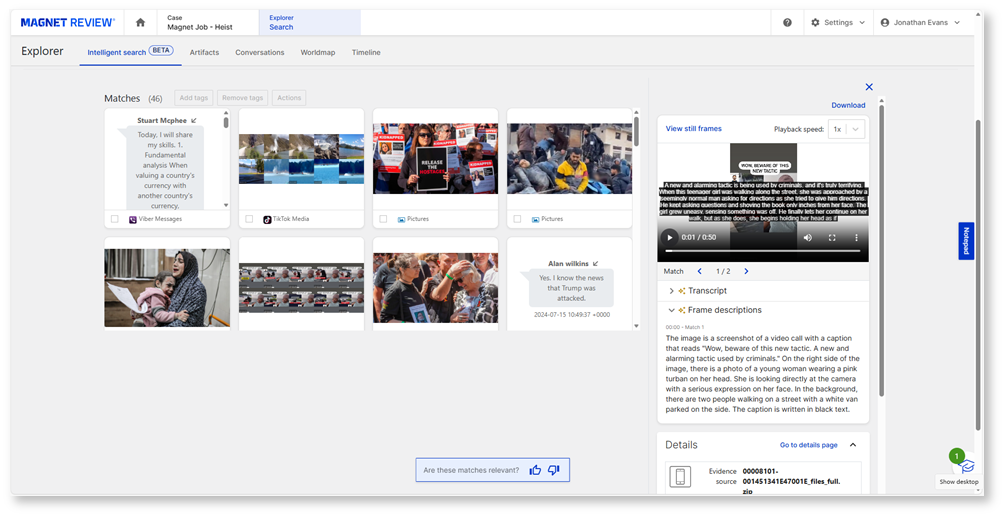
The value of this added context really shines with video files, the most potentially insight-rich but also the most time-consuming results to search conventionally. Here, Intelligent Search can be a game changer, condensing hours of manual review time into mere seconds!
You’ll now get a playable preview of your video, with the option to immediately download the full file. You can choose to play the video back at a variety of speeds or view still frames to facilitate your review. Even better, Intelligent Search will also index your video with timestamps that match your query, so you can go right to the sections of the video that matter most. You’ll also get a summary that describes what’s happening in the frame and a full transcript of any audio that you can search for further insights or download to preserve; this transcript will also appear as captions in your video.
Your other returned results will also include valuable added context, with timestamps and transcripts for audio files, descriptive captions for pictures, and in-line display and a summary of participants for your messages.
Ensure the integrity of your work
With all the recent attention on AI technology, we know that you might be wondering how it might impact the chain of custody of your evidence and the overall integrity of your digital investigations.
First introduced with Axiom 2.0 in 2018, Magnet AI is guided by the same principles that have defined Magnet Forensics and our products from the beginning. Our core AI technology and the experiences like Intelligent Search that it enables are purpose-built for justice, with deliberate feature selection, responsible innovation, and reliable outputs, so you can rest assured that every Magnet AI-assisted insight is explainable, reviewable, grounded in evidence, and built to stand up to scrutiny in court and in public.
With Intelligent Search, we want to help you make informed decisions about confidently using AI in your investigations, with your judgement remaining central at every stage. AI ranks but you validate.
We also know that forensic soundness is never optional, so your evidence remains stored and secured within your geographical region and is never altered.
However, if your agency is still in the process of validating the use of AI technology in your investigations, you can choose to disable Intelligent Search in your Review tenant in Settings.
You can learn more about our Founding Principles of AI at Magnet Forensics here, and be sure to visit our AI Unpacked hub for more AI-related content.
Performance enhancements that save you even more time
In addition to Intelligent Search, our teams have been hard at work to deliver several other important new performance and feature improvements to help you get even more out of Review.
Vastly improved ingestion speed
Firstly, we’re excited to share that we’ve made some major enhancements to our artifact ingestion process, with overall ingestion speed boosted by 84%! This will substantially reduce both the waiting times for evidence amongst your investigative teams while also accelerating your case preparation in the lab. You’ll also now be able to monitor your upload progress in-flight to ensure that everything is going smoothly.
Faster tagging and fewer clicks
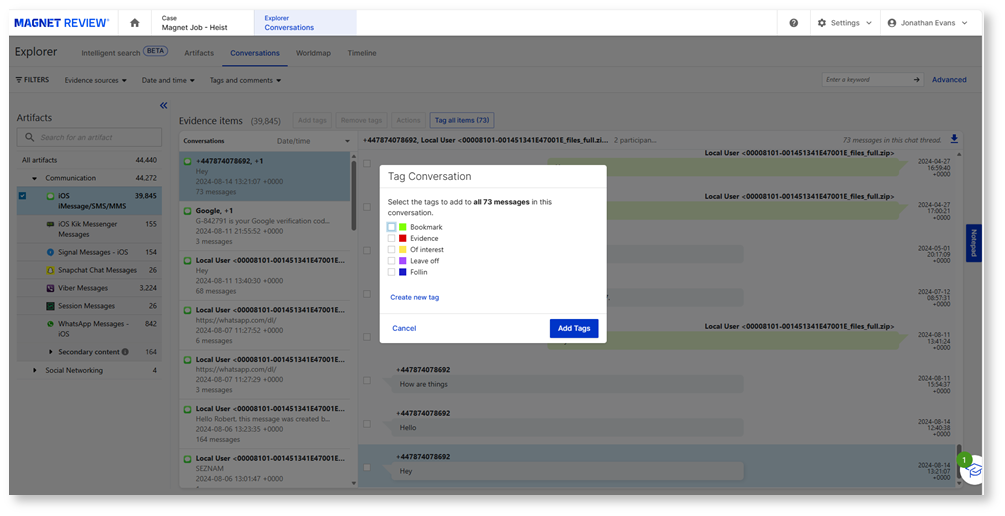
With bulk tagging now available for chat threads, you can now easily tag all messages in a chat thread rather than individually. This is a huge time saver when dealing with large threads.
You’ll also now be able to view comments from your artifacts in a list view by simply hovering over the comment icon, rather than diving into the artifact details.
Further, you’ll now be able to import key device information from Magnet Axiom—including IMEI and other device identifiers—directly in Review in your evidence summaries for faster reference.
New Viewer role
We’ve added a new user role, Viewer, that will enable you to provide case access to team members in a read-only mode where they can search and filter but not alter your case or its data.
Resume your review on login
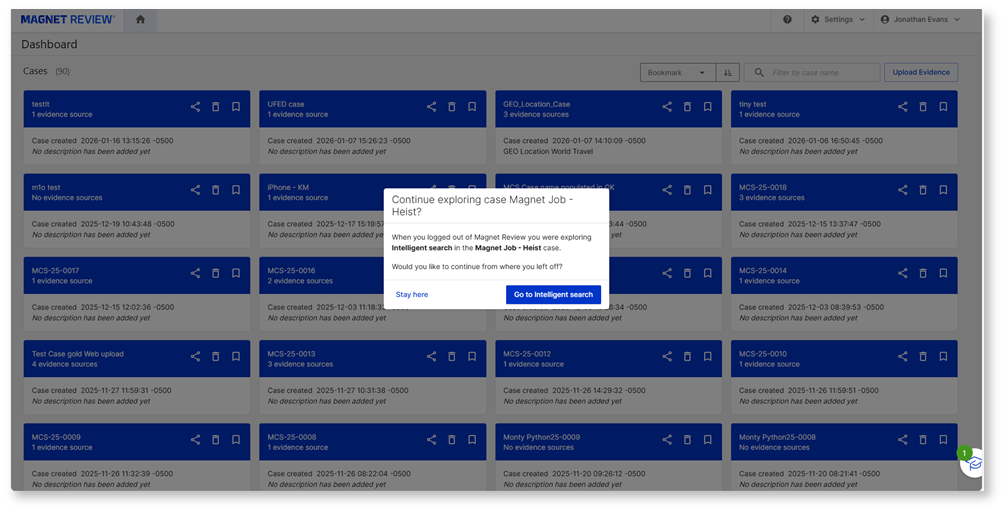
Finally, we’ve now also increased the logout timer when multiple tabs are open to prevent you from being logged out, and on the occasion when you do log back in to your case, it will immediately bring you to where you were in your last session to help you quickly resume your review.
Start saving time and effort in your cases today!
With Review Lite, you can now experience Review’s powerful evidence review features like Intelligent Search for free! Simply visit magnetreview.com to create your free account, which allows you to store up to three cases simultaneously and share them with an unlimited number of reviewers.
If your organization requires more advanced user and system management capabilities, we also have other SaaS-based, customer-cloud hosted, and on-prem options available to help you provision users and control Review across your teams, including both internal and external stakeholders. Reach out to our experts to help you decide which version of Review is right for your organization.