
Vehicle forensics: a practical guide
Understand how to identify, preserve, extract, analyze, and report digital evidence for modern vehicle forensic investigations.
By Steve Gemperle
Key takeaways
- Vehicle data comes from two main lanes: EDR (crash) data, and infotainment and telematics data. They answer different questions and are strongest when used together.
- Confirming legal authority and preserving volatile data before acquisition are the foundations of a defensible investigation.
- The right acquisition method depends on the investigation type, not just the vehicle; consent searches call for less invasive access than a warrant might allow.
- Cross-referencing timestamps across EDR, infotainment, telematics, and phone or cloud records is essential to building a timeline that holds up to scrutiny.
Vehicle forensics is where traditional investigation meets the rolling computer sitting in the driveway, impound lot, or crash scene. Today’s automobiles, trucks, motorcycles, commercial fleets, and connected mobile devices generate a remarkable amount of digital evidence — from crash data and diagnostic records to location history, paired-device artifacts, telematics events, over-the-air update activity, app-based commands, cloud-hosted records, onboard video, and in-cabin sensor data — evidence types that continue to expand as manufacturers encrypt more of what they collect.
A strong vehicle forensic investigation rarely depends on one source alone. Instead, it brings together vehicle data, mobile device evidence, cloud records, roadway facts, insurance materials, repair history, and witness information to tell a clearer, more defensible story.
When done well, vehicle forensics is thorough, careful, repeatable, and legally defensible. Examiners should confirm their authority before accessing data, preserve evidence that may be volatile or easily overwritten, choose the least intrusive acquisition method available, validate tool output, and clearly separate observed facts from interpretation. The strongest findings usually come from connecting multiple evidence streams — Event data recorder (EDR) data, infotainment artifacts, telematics records, physical crash evidence, and outside records — into a single timeline that can withstand scrutiny.
The primary sources of vehicle evidence
Data obtained from the event data recorder (EDR)
Event data recorders (EDR) are often described as a vehicle’s “black box,” but they’re more like a focused snapshot of what the vehicle was doing around a qualifying crash event.
Depending on the vehicle and module, EDR data may include speed, brake application, accelerator position, steering input, seatbelt status, airbag deployment, delta-v, engine speed, stability control activity, and diagnostic status. This information is especially valuable when reconstructing the final seconds before impact, evaluating occupant restraint use, and comparing recorded vehicle behavior against physical evidence and reported accounts.
Infotainment and in-vehicle information systems
Infotainment systems can be surprisingly informative. They may retain details about paired phones, Bluetooth connections, call logs, contact names, text message metadata, navigation destinations, recent routes, media usage, Wi-Fi connections, device identifiers, application activity, and user profiles.
In practical terms, these artifacts can help answer questions such as who may have interacted with the vehicle, where it may have traveled, which devices connected to it, and whether a user or system interaction occurred near the time of an incident.
Telematics, connected services, and cloud records
In connected vehicles, important evidence may exist well beyond the vehicle itself. Telematics systems and connected service platforms may record trip history, ignition events, GPS locations, speed, remote lock or unlock activity, crash notifications, diagnostic trouble codes, battery status, odometer readings, maintenance alerts, mobile app commands, and account activity.
Some of this information may live with the manufacturer, fleet provider, companion app, or third-party vendor. Because retention periods and access requirements vary widely, investigators should identify potential custodians early and move quickly when preservation is needed.
Electronic control units and vehicle networks
Vehicles contain numerous electronic control units that communicate over networks such as CAN, LIN, FlexRay, Ethernet, and manufacturer-specific buses. These modules may include powertrain, braking, steering, airbag, body control, advanced driver assistance, battery management, and gateway systems. Forensic value may come from diagnostic trouble codes, freeze frame data, fault histories, counters, calibration information, odometer values, key cycles, and timestamps. Interpretation requires care because timestamps may be relative, module clocks may drift, and data can be overwritten by continued vehicle operation.
Legal authority and privacy considerations for vehicle data
Before anyone touches the data, the first question should be simple: what authority allows access?
Depending on the jurisdiction and case type, that authority may come from owner consent, insurer authorization, fleet policy, employment policy, a search warrant, court order, subpoena, preservation letter, civil discovery order, or contractual rights. Physical possession of a vehicle should not be treated as automatic permission to access every system, account, or cloud record connected to it.
Vehicle data can be extremely personal. It may include contact names, phone identifiers, call history, messages and message history, home and work addresses, routes, account details, and other sensitive information.
Collection should stay within the authorized scope, unnecessary disclosure should be avoided, and privacy minimization steps should be documented. When cloud records are involved, timely preservation is critical because data may disappear quickly and access may require additional legal authority.
How to secure and preserve vehicle evidence
Before vehicle evidence can be preserved, a few baseline steps protect it from being altered or lost:
- Secure the vehicle and prevent unauthorized access, towing, repair, power cycling, or infotainment interaction.
- Photograph the vehicle exterior, interior, dashboard, odometer, infotainment screen, charging state, connected devices, cables, and visible aftermarket equipment.
- Document the vehicle identification number, license plate, make, model, year, trim, mileage, key status, damage condition, and power state.
- Identify all data sources: EDR, infotainment, telematics, navigation, dash camera, aftermarket devices, fleet systems, mobile apps, and cloud accounts. Determine which of these sources need to be collected.
- Preserve related devices and accounts, including phones, keys, fobs, memory cards, USB drives, and companion applications.
- Maintain chain of custody for the vehicle, modules, extractions, photographs, notes, and exported reports.
- Avoid starting, driving, pairing devices, deleting profiles, connecting to Wi-Fi, or changing settings unless required for a documented acquisition procedure.
How to choose the right acquisition strategy
The best acquisition strategy depends on the authority granted, the condition of the vehicle, the volatility of the data, tool support, the risk of alteration, and the investigative questions at hand. As a rule, the preferred approach is the least intrusive method that still produces complete, verifiable, and repeatable results. In many cases, the strongest answer comes from combining EDR data, infotainment artifacts, telematics records, and physical context rather than relying on a single source to carry the entire investigation.
| Method | Typical use | Advantages | Risks or limits |
| Diagnostic port acquisition | EDR download, module queries, diagnostic data | Often non-destructive and manufacturer-supported | May require power, tool support, and vehicle stability |
| Bench acquisition | Damaged vehicles or removed modules | Can reduce vehicle power-on risk | Requires correct pinouts, wiring, and module handling |
| Infotainment logical extraction | User artifacts, navigation, paired devices | Targeted and efficient | May not recover deleted data or full file systems |
| Physical or chip-level acquisition | Unsupported systems, damaged modules, deeper recovery | Potentially broader artifact recovery | Higher risk, specialized skill, possible destructive handling |
| Cloud or provider export | Telematics, app events, trip logs, remote commands | Can include off-vehicle records not stored locally | Requires legal process, provider cooperation, and retention awareness |
Some of the methods listed above are highly destructive and may permanently damage vehicle components during extraction. Specifically, physical or chip-level acquisition. This may require significant deconstruction of the vehicle’s dashboard, removal of parts, and subsequent removal of the chip from the motherboard. Once this chip is removed, it may have to be “milled” to be able to extract data. Occasionally, this process can break these chips, rendering the data unable to be extracted. In time-sensitive cases, the tradeoff between acquisition speed and completeness becomes its own strategic decision. See Shadow labs and the case for purpose-driven forensics for more on triage-first approaches to digital evidence.
How a vehicle forensic examination works
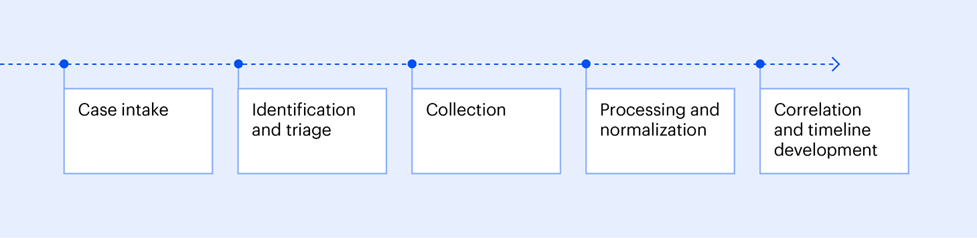
Case intake
A good examination starts with good questions. Before collection begins, define what questions the investigation needs to answer:
- Was the vehicle at a specific location?
- Who may have operated it?
- Did braking or acceleration occur before impact?
- Was a phone connected or in use?
- Did safety systems activate?
- Does the recorded data support the reported timeline?
- Is the data on the vehicle encrypted?
Clear intake questions help determine what to preserve, what to collect first, and how the final findings should be framed.
Identification and triage
Identification and triage help determine where the evidence may be hidden and how quickly it needs to be preserved. Examiners should identify the vehicle configuration, installed modules, software versions, subscription services, aftermarket devices, keys, mobile devices, and network connectivity. It’s also important to understand whether the vehicle is electric, hybrid, autonomous-capable, fleet-managed, rented, leased, personally owned, or commercially operated.
Early triage can reveal whether volatile data is at risk, whether repairs have already changed the evidence picture, and whether cloud preservation requests should be sent immediately.
Collection
Perform collection using validated tools and documented procedures. Record the tool name, version, cable or adapter configuration, vehicle power state, module identifiers, acquisition start and end times, operator, environmental conditions, error messages, and any deviations from the standard process. When multiple acquisitions are possible, collect in an order that reduces overwrite risk and preserves the highest value evidence first.
Processing and normalization
Process extracted vehicle data in a controlled forensic environment. Preserve original exports, create working copies, calculate hashes where applicable, normalize timestamps, identify time zones, document clock sources, and retain raw artifacts supporting each interpretation.
If a tool produces a report, preserve both the report and underlying source files when available. Do not rely solely on a formatted report when raw artifact review is necessary.
Correlation and timeline development
Build a timeline that correlates vehicle artifacts with external evidence. Compare EDR pre-crash data to physical damage, roadway marks, airbag deployment, occupant statements, surveillance video, phone records, GPS tracks, toll records, repair records, and telematics events. Flag time-source uncertainty, duplicated records, possible clock drift, missing intervals, and inconsistent data. State whether each conclusion is directly supported, inferred, or unsupported.
How to interpret vehicle artifacts
Speed, braking, and driver inputs
Speed and driver input data can be powerful but must be interpreted within system limitations. Confirm sampling rate, units, event trigger, recording duration, module source, and whether data represents wheel speed, calculated vehicle speed, or another value. Compare braking and throttle data with crash reconstruction findings, vehicle damage, road conditions, ABS activity, and stability control data.
Location and route data
Location artifacts may appear as GPS points, destinations, routes, breadcrumb trails, map cache entries, geofences, trip summaries, charging locations, or app-generated events.
Validate whether each location reflects actual travel, a searched destination, a saved favorite, a predicted route, a paired phone artifact, or a cloud synchronization record. When precision matters, account for GPS accuracy, map matching, cellular positioning, parking garage limitations, and clock discrepancies.
Paired devices and user attribution
Paired device artifacts may identify phones, contacts, call records, message metadata, Bluetooth identifiers, Wi-Fi identifiers, user profiles, and connection times. These artifacts can support user attribution but rarely prove who was driving by themselves. Correlate device connections with seat position memory, key use, phone location, biometrics, vehicle user profiles, witness information, toll records, and physical evidence. Phone-to-vehicle pairing data like this has helped investigators solve a series of auto theft crimes in real cases.
Advanced driver assistance and automation data
Advanced driver assistance systems may generate data related to adaptive cruise control, lane keeping, automatic emergency braking, blind spot monitoring, parking assistance, driver monitoring, camera inputs, radar detections, lidar outputs, and system disengagements.
Analysis should distinguish between system availability, system activation, driver override, warnings issued, sensor limitations, and recorded events. Manufacturer-specific documentation is often required to interpret these artifacts responsibly.
Electric and hybrid vehicle artifacts
Electric and hybrid vehicles may record battery state of charge, charging sessions, charging locations, thermal events, high voltage system status, regenerative braking, energy consumption, battery faults, plug-in activity, and mobile app commands. These artifacts can assist with route reconstruction, vehicle availability, fire analysis, warranty disputes, and claims involving range, charging, or post-collision electrical behavior.
Quality assurance and validation: what makes vehicle forensics different
Vehicle forensics carries a validation challenge that most digital forensics doesn’t: the acquisition itself can alter or destroy evidence. Starting a vehicle for a live acquisition creates new data. Chip-level extraction requires physically disassembling the module and is inherently destructive. That makes detailed examination notes the difference between a defensible finding and an unsupported one.
Because that risk is built into the acquisition process itself, validation has to work harder here than in other forensic disciplines:
- Use current, validated tools and document tool versions, release notes, and known limitations.
- Retain original exports, screenshots, photographs, logs, and examiner notes.
- Repeat acquisitions where appropriate and compare outputs for consistency.
- Validate significant findings against independent sources whenever possible.
- Document unsupported vehicles, failed acquisitions, partial extractions, and tool errors.
- Maintain a clear distinction between raw data, processed data, examiner interpretation, and expert opinion.
- Peer review reports involving litigation, serious injury, fatality, high-value insurance claims, or disputed interpretation.
What belongs in a vehicle forensics report
A vehicle forensics report should be clear enough for non-technical readers and detailed enough for independent review. It should identify the evidence examined, the authority relied upon, the tools and methods used, any limitations encountered, the artifacts recovered, the timelines developed, and the conclusions reached.
The best reports are confident without being overstated: they explain what the data shows, what it does not show, and where reasonable uncertainty remains.
Recommended report structure
- Executive summary
- Scope, authority, and assignment questions
- Evidence received and chain of custody
- Vehicle identification and condition
- Tools, methods, and acquisition details
- Recovered artifacts and source descriptions
- Timeline and correlation analysis
- Findings and limitations
- Conclusions stated with appropriate confidence
- Appendices containing logs, photographs, tables, and supporting records
Pitfalls to avoid in vehicle forensics investigations
With any investigative strategy, there are common pitfalls that can adversely affect the results of the examination:
- Starting, moving, repairing, or scanning the vehicle before preservation decisions are made.
- Assuming all timestamps are accurate, synchronized, or in the same time zone.
- Treating a searched destination as proof of travel.
- Treating a paired phone as proof of driver identity without corroboration.
- Relying only on tool-generated reports without reviewing raw or supporting data.
- Failing to preserve cloud records before retention periods expire.
- Overlooking aftermarket devices, fleet equipment, dash cameras, toll tags, and charging records.
- Failing to document tool errors, unsupported modules, partial data, and examiner decisions.
- Overstating EDR data beyond its recording window, trigger context, or sampling limits.
- Ignoring privacy restrictions and scope limitations.
Field checklist
This checklist pulls the key tasks from every stage of a vehicle forensics examination, from confirming authority to documenting limitations in the final report:
| Task | Complete | Notes |
| Confirm authority and scope | ||
| Secure the vehicle and prevent access | ||
| Photograph exterior, interior, dashboard, infotainment, damage, and connected devices | ||
| Record VIN, mileage, key status, power state, and vehicle condition | ||
| Identify EDR, infotainment, telematics, dashcam, aftermarket, and fleet systems | ||
| Preserve phones, keys, memory cards, USB devices, apps, and cloud accounts | ||
| Select acquisition method and document tool versions | ||
| Capture extraction logs, reports, screenshots, and hashes where applicable | ||
| Correlate vehicle data with external evidence | ||
| Document limitations and unresolved questions |
The science of vehicle data acquisition
Modern vehicles don’t need a major crash or airbag deployment to record data.
Sometimes a vehicle may save data after a smaller event, such as a seatbelt-related check or another signal the system considers worth recording. That said, not every incident creates a record. For example, pedestrian-related crashes may not always trigger the system unless the impact is severe enough, or an airbag deploys. This information is often described as coming from a vehicle’s “black box,” though the exact way it’s stored and whether it can be overwritten depends on the manufacturer.
There are also different kinds of vehicle data. Information from the entertainment, navigation, and connected car systems can be especially helpful because it often shows what happened without needing much extra interpretation.
Speed information can be more complicated. Some systems record the vehicle’s actual speed, while others calculate speed based on how far the vehicle moved over a period of time. That difference matters. For example, if a car drove in a circle and ended up back where it started, one type of calculation might show no movement at all, even though the car clearly traveled a distance. Different manufacturers also record data at different intervals, so the amount of detail can vary from one vehicle to another. This is the distinction between recorded velocity and derived velocity.
Infotainment systems can also recover short video clips, voice commands, and audio recordings, in addition to navigation searches and location-related data.
How useful that data is varies widely by make and model: some manufacturers retain rich records while others provide little data or data that is harder to work with.
One of the biggest challenges for toolmakers is keeping up with how quickly vehicles change. A model may be updated every year or two, and the same vehicle system may have several versions made by different suppliers. Each version can require its own research and testing before data can be collected properly. That creates constant pressure on the teams responsible for figuring out how these systems work.
Vehicle forensics vendors and tools
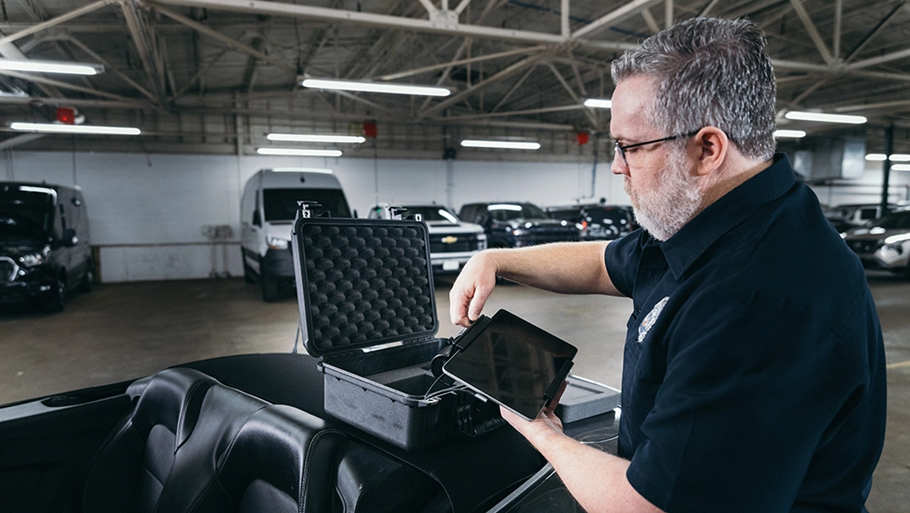
Vehicle forensics tooling splits into two main lanes: infotainment/telematics extraction and EDR crash data retrieval. As manufacturers have moved to encrypt infotainment data, older acquisition methods have become less viable, and newer tools have been built specifically to work within these constraints.
| Company | Specialty | Notes |
| Berla | Vehicle infotainment and telematics forensics | Known for the iVe Ecosystem, which supports identifying supported vehicles, acquiring data from vehicle systems, and analyzing artifacts such as location history, paired devices, calls, contacts, routes, and system activity. |
| Magnet Forensics | Non-intrusive vehicle infotainment extraction and integration with broader digital investigations | Magnet Autokey focuses on encrypted vehicle data, location history, connected phones, and system activity, with workflow integration into Magnet’s broader case ecosystem, accelerating vehicle investigations end to end. Magnet Axiom supports importing Berla iVe backups and analyzing artifacts. Magnet Axiom will also parse out data collected from some file structure types acquired by chip-off or ISP (ex. QNX file structure) |
| Bosch CDR | Event Data Recorder / “black box” crash data | Bosch is widely associated with CDR tooling used to retrieve EDR crash data such as speed, braking, throttle, seatbelt, and crash severity. This is a different lane than infotainment forensics. |
| Oxygen Forensics | Analysis platform that can ingest vehicle forensic exports | Oxygen Forensic Detective supports importing Berla iVe backups and analyzing artifacts such as connected devices, contacts, calls, search history, location history, speed information, and media files. |
| RUSOLUT | Physical acquisition and reconstruction from infotainment, telematics, wireless, and eCall modules | Its Vehicle Data Reconstructor targets module-level extraction, including ISP/chip-off style acquisition and parsing from infotainment head units and telematics modules. |
| Teel Tech | Physical acquisition from Chip-off, ISP, JTAG | Teel Tech targets workbench gear and equipment required to remove chips from boards and extract the data from these devices. |
How vehicle forensics insights compare
Which lane matters depends on the investigation. Infotainment tells you where a vehicle went and what devices interacted with it. EDR tells you what the vehicle was doing in the seconds around a specific event.
Infotainment and telematics forensics is where Berla, Magnet Forensics, Oxygen Forensics, RUSOLUT, and Teel Tech are most relevant.
EDR data is Bosch CDR’s main lane. This data supports a range of investigative and legal use cases, including crash reconstruction, insurance investigations, civil litigation, criminal investigations, product liability matters, and fleet or commercial vehicle incidents.
Depending on the vehicle, module, manufacturer, and event, Bosch CDR data may include:
- Vehicle speed before impact
- Brake application
- Throttle position
- Engine RPM
- Steering input
- Seatbelt status
- Airbag deployment status
- Delta-V / crash severity
- Ignition cycles
- Event timing
- Stability control or ABS activity
- Occupant-related indicators where supported
This data is typically focused on a short window around a crash event rather than long-term user activity.
Vehicle forensics tool comparison chart
| Magnet Autokey | Magnet Axiom | Berla | Bosch CDR | Oxygen | RUSOLUT | Teel Tech | |
| Infotainment/telematics extraction | ✅ | ✅ | ✅ | ✅ | ✅ | ||
| Encrypted vehicle data access | ✅ | ||||||
| EDR/crash data | ✅ | ||||||
| Physical/chip-off/ISP acquisition | ✅ | ✅ | |||||
| Imports and analyzes 3rd party exports | ✅ | ✅ | |||||
| Broader digital forensics platform | ✅ | ✅ |
How EDR differs from infotainment and telematics
EDR and infotainment data answer different investigation questions. EDR typically answers what the vehicle was doing around a crash; infotainment forensics helps answer where the vehicle had been, what devices interacted with it, and what user activity occurred before or after the event. Together, they turn a narrow crash snapshot into a broader investigative timeline.
| Area | EDR | Infotainment |
| Primary focus | Crash event data | Infotainment, telematics, and user activity artifacts |
| Typical question answered | “What happened immediately before and during the crash?” | “Where has the vehicle been, what devices were paired, and what user activity exists?” |
| Data time range | Seconds before/during/after a crash | Potentially broader historical artifacts |
| Primary users | Accident reconstructionists, law enforcement, insurers, litigators | Digital forensic examiners, investigators, analysts |
| Evidence type | EDR / crash module data | Infotainment, navigation, connected-device, and telematics artifacts |
| Data structure | Structured and standardized. Manufacturers save EDR data the same way. | No industry standard. Structure varies by vehicle, even at the chip level within the same make and model. |
| Workflow | Crash-data download and interpretation | Digital acquisition, parsing, correlation, and reporting |
EDR and infotainment data: How they work together
Treated as complementary evidence streams rather than competing ones, EDR and infotainment data together can turn a narrow crash snapshot into a full investigative timeline. EDR anchors the crash event itself — precise, structured, and time-bound. Infotainment fills in what surrounds it: where the vehicle had been, what devices were connected, and what activity occurred before or after.
In practice, that looks like:
- Timeline correlation: EDR’s crash-window data (impact timing, delta-V) lines up against infotainment’s activity log (navigation, Bluetooth events, media use) to build a fuller sequence of events.
- Location and route validation: EDR rarely captures travel history in depth; infotainment’s saved destinations and route data can confirm whether a vehicle’s location aligns with a reported route or witness account.
- Behavioral context: EDR shows vehicle inputs immediately before a crash; infotainment can add whether a phone was paired or navigation was active. This needs careful framing — device activity alone doesn’t establish who was using it or whether a driver was distracted.
- Timestamp alignment: EDR, infotainment, telematics, and phone or cloud records can each run on different clocks, so cross-referencing timestamps is a necessary step toward a defensible timeline.
Applied to specific investigative questions, this looks like:
Practical integration matrix
| Investigative question | EDR contribution | Infotainment contribution |
| What happened on impact? | Crash severity, airbag deployment, delta-V, event timing | Limited unless system logs contain relevant event artifacts |
| How was the vehicle being operated? | Speed, braking, throttle, steering, seatbelt status | May provide route, navigation use, and trip context |
| Where had the vehicle been? | Usually limited | Stronger source for destinations, routes, searches, and location artifacts |
| Was the phone connected? | Usually limited or unavailable | Stronger source for paired devices, Bluetooth events, calls, contacts, and media |
| Was there a potential distraction? | Can show late braking or steering behavior, but not cause | May show device/system activity, but attribution requires caution |
| Does the evidence support a timeline? | Anchors the crash event | Provides pre/post-event context and activity history |
Key takeaway
EDR is the crash-event anchor. Infotainment forensics is the behavioral and location context layer. Used together, they can produce a more complete and defensible reconstruction: EDR explains the vehicle’s physical behavior at the critical moment, while infotainment artifacts help explain the route, device activity, and user-interaction context surrounding it.
Vehicle forensics landscape
| Area | Berla | Magnet Forensics | Bosch CDR |
| Core focus | Purpose-built vehicle forensics | Broader digital forensics platform with a vehicle forensics product | Crash event data (EDR) |
| Primary product | iVe Ecosystem | Magnet Autokey | Bosch CDR |
| Typical use case | Dedicated vehicle data acquisition and analysis | Adding vehicle artifacts into larger digital investigations involving phones, computers, cloud, and other evidence | Crash reconstruction, insurance investigations, litigation |
| Data emphasis | Location history, routes, paired devices, calls, contacts, media, events, system activity | Location history, connected phones, encrypted vehicle data, and artifacts that can be correlated with other case evidence | Speed, braking, throttle, steering, seatbelt status, airbag deployment, delta-V |
| Workflow advantage | Strong vehicle-specific identification, acquisition, decoding, and reporting | Strong cross-evidence correlation when investigators already use Magnet tools | Fast, standardized crash data download and interpretation via manufacturer-approved hardware/software |
Building a defensible investigation
Vehicle forensics succeeds when investigators treat the vehicle as one evidence source among several rather than a single point of truth. EDR data anchors what happened in the seconds around a crash; infotainment and telematics data supply the surrounding context — where the vehicle had been, what devices interacted with it, what activity occurred before or after. Neither tells the full story alone, and the strongest investigations are the ones that connect vehicle data to mobile devices, cloud records, and outside evidence into a single, defensible timeline.
The tooling landscape will keep shifting as vehicles change and manufacturers encrypt more of what they collect. What won’t change is the underlying discipline: confirm authority before acquiring data, preserve what’s volatile, choose the least intrusive method that gets the job done, and validate everything before it becomes a finding. Tools like Magnet Autokey are built around that same principle: non-intrusive acquisition that fits into existing digital forensics workflows.
References
- Current SWGDE best practices for vehicle infotainment and telematics systems.
- NHTSA and 49 CFR Part 563 materials governing event data recorders and required data retrievability for covered vehicles.
- Manufacturer service documentation, EDR retrieval guidance, scan-tool procedures, and technical service bulletins.
- Tool vendor validation documentation, supported vehicle lists, known issues, and release notes.
- Applicable jurisdictional law governing consent, warrants, subpoenas, privacy, insurance access, civil discovery, and employment or fleet policy.

Steve Gemperle is the Manger of Technical Marketing and Forensics at Magnet Forensics. Prior to joining Magnet, Steve was a Senior Special Agent with the United States Secret Service who specialized in cyber-crime until retiring in 2021. For the last decade of his career with the Secret Service he focused on computer crimes and served as Lab Director for the US Secret Service Southwest Regional Computer Forensic Lab. Steve has completed over 1900 forensic exams and 150 network intrusion investigations while working for the Secret Service, and has been recognized as one of the US Secret Service’s top network intrusion investigators.